RoboDojo#
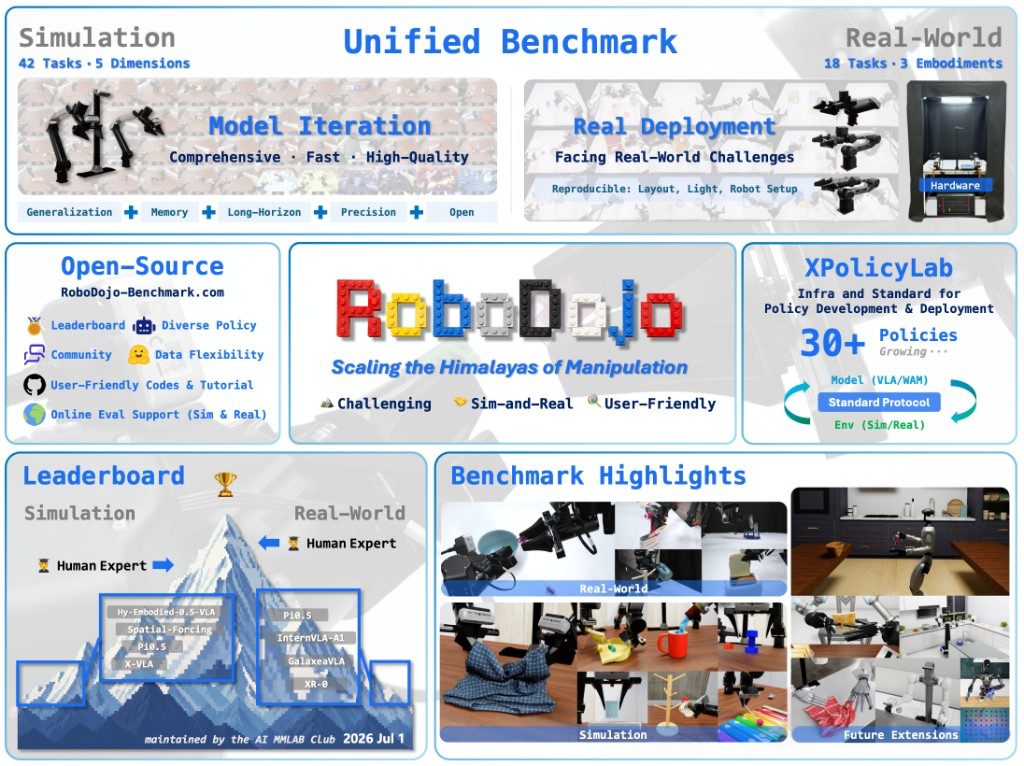
RoboDojo simulation and real-world benchmark overview. Source: RoboDojo project.#
Run bimanual tabletop tasks with RPent in the RoboDojo simulator. The simulator uses Isaac Sim / IsaacLab with dual ARX-X5 arms. RPent supports VPP2 and Awomo05 action models and provides motion primitives and SAM3 object segmentation tools.
Overview#
Analytical primitives, VPP2 (default), and Awomo05
api, claude_code, codex, gemini_cli
Bottle disposal, pen-holder filling, bowl stacking, and other tabletop tasks.
Linux, NVIDIA GPU; Python 3.11; Isaac Sim 5.1.
Tasks#
The RoboDojo simulation task catalog groups 42 benchmark tasks into five capability categories:
Category |
Tasks |
Focus |
|---|---|---|
Generalization |
12 |
Varied objects and layouts, including random variants. |
Memory |
6 |
State tracking and sequence recall. |
Precision |
8 |
Manipulation with tight spatial constraints. |
Long-Horizon |
8 |
Multi-step tasks with several subgoals. |
Open |
8 |
Open-ended or language- and image-conditioned tasks. |
Observation and Action#
Item |
Description |
|---|---|
Observation |
Head and left/right wrist RGB-D images, camera calibration, and joint states, end-effector poses, and gripper states for both arms. |
Action |
|
Reward / success |
RoboDojo’s native environment determines task success, recorded in the |
Task prompt |
The current scene’s RoboDojo task description, read through |
Installation and Resources#
For NVIDIA driver recommendations, see the Isaac Sim 5.1 system requirements. The host also needs the CUDA toolkit/NVCC and a compiler toolchain to build cuRobo. From the RPent root, create an environment and install the dependencies:
uv venv --python 3.11 .venv-robodojo
source .venv-robodojo/bin/activate
uv pip install -e ".[robodojo-sim,sam3]" --extra-index-url https://pypi.nvidia.com \
  --override requirements/robodojo-override.txt
Blackwell GPU installation
For Blackwell GPUs, install the CUDA 12.8 build of PyTorch 2.7.0.
Use the following command for initial installation or reinstallation;
--torch-backend=cu128 selects the CUDA 12.8 build:
uv pip install -e ".[robodojo-sim,sam3]" --extra-index-url https://pypi.nvidia.com \
  --override requirements/robodojo-override.txt \
  --torch-backend=cu128
If torch==2.7.0+cu126 is already installed, uv considers it compatible
with the version requirement and keeps it. Append
--reinstall-package torch --reinstall-package torchvision to the command
above to replace it with the CUDA 12.8 build.
The pinned IsaacLab revision needs an editable installation to locate its extension configuration. Clone it into a writable directory and install it in the same environment:
git clone --no-checkout https://github.com/yuechen0614/IsaacLab.git /path/to/IsaacLab
git -C /path/to/IsaacLab checkout afca7b09d60d8beb9c1cb28b43066499940b969b
uv pip install --no-deps \
  -e /path/to/IsaacLab/source/isaaclab \
  -e /path/to/IsaacLab/source/isaaclab_assets \
  -e /path/to/IsaacLab/source/isaaclab_tasks
Keep this checkout after installation; the runtime still uses it.
Download Simulator Resources#
Download the robot, object, material, and layout files from the RoboDojo dataset and set the resource directory:
hf download RoboDojo-Benchmark/RoboDojo --repo-type dataset \
  --include 'Assets/**' --local-dir /path/to/robodojo
export ROBODOJO_ASSETS_ROOT=/path/to/robodojo
The download should contain Assets/Robots, Assets/Object,
Assets/Material, and Assets/Eval_Layout.
Generate robot configurations pointing to your local resource directory:
python - <<'PY'
import os
import runpy
from robodojo_runtime import source_root

script = source_root() / "utils/update_embodiment_config_path.py"
os.chdir(os.environ["ROBODOJO_ASSETS_ROOT"])
runpy.run_path(str(script), run_name="__main__")
PY
test -s "$ROBODOJO_ASSETS_ROOT/Assets/Robots/x5/curobo.yml"
Run this once after downloading or moving the resources. It regenerates
*.yml files from *_tmp.yml templates, overwriting existing configurations.
Some NVIDIA resources referenced by the scene load online by default. For offline use or repeated resource-loading failures, see Scene Assets Fail to Load at the end of this page.
VLA Configuration#
Configure one action model. The first-run example below uses VPP2, the default.
To use Awomo05, add --am-backend awomo05 to your run command.
The model implementations and weights are available here:
VPP2: the official VPP2 RoboDojo implementation and the paired 100k weights from Haodong082399/VPP2.
Awomo05: the official author implementation, the XPolicyLab RoboDojo evaluation adapter and the Auwomo/Awomo-0.5-Robodojo weights and matching statistics.
Install model dependencies separately using the corresponding inference
environment instructions. RPent starts and stops the model service using its
current Python environment by default, loading the full model on one GPU.
If the model is installed in a separate Python environment, add --am-python
to the rpent task command to specify that environment’s Python executable,
and use --am-checkpoint to specify the model directory. See the complete
example under Run a Task below.
VPP2 Setup#
Prepare the VPP2 implementation and paired weights above. Choose a resource
directory and replace /path/to/vpp2 with your own directory:
export VPP2_MODEL_PATH=/path/to/vpp2
git clone --no-checkout https://github.com/roboterax/video-prediction-policy-2.git \
  "$VPP2_MODEL_PATH/policy"
git -C "$VPP2_MODEL_PATH/policy" checkout 72c17acf022494ff63617be86079bb92e92f5bf8
hf download Haodong082399/VPP2 --local-dir "$VPP2_MODEL_PATH" \
  --include 'checkpoints/joint2b_s100000/**' \
  --include 'checkpoints/Wan2.1-I2V-14B-480P/**'
The resource root has the following layout. Subdirectories may be symbolic links to existing resources:
vpp2/
├── policy/src/vpp2/policy.py
└── checkpoints/
    ├── joint2b_s100000/
    │   ├── action.pt
    │   ├── video.pt
    │   └── dataset_stats.json
    └── Wan2.1-I2V-14B-480P/
Install the model dependencies using the pinned project’s
inference environment instructions.
Set VPP2_MODEL_PATH to start this model automatically when running a task.
Start a standalone VPP2 service (optional)
To manage the service yourself, install the policy dependencies and RPent’s core package in the model environment, then start the service:
python -m robots.robodojo.vpp2_server --model-path /path/to/vpp2 \
  --host 127.0.0.1 --port 9201
Add --am-endpoint socket://127.0.0.1:9201 to the task command in the
RPent/simulator environment. RPent starts and stops its own model process;
independently started services remain under their operator’s control.
For remote deployment, see Remote Services and Parallel Runs.
Awomo05 Setup#
Prepare the Awomo05 evaluation implementation and paired weights above.
Choose a resource directory and replace /path/to/awomo05 with your own directory:
export AWOMO05_MODEL_PATH=/path/to/awomo05
git clone --no-checkout https://github.com/RoboDojo-Benchmark/RoboDojo.git \
  "$AWOMO05_MODEL_PATH/policy"
git -C "$AWOMO05_MODEL_PATH/policy" checkout 2184bf8844ea9d205382c4aefa3a694311418251
git -C "$AWOMO05_MODEL_PATH/policy" submodule update --init XPolicyLab
git -C "$AWOMO05_MODEL_PATH/policy/XPolicyLab" fetch origin 562c14cf08b9e6e411e7d76f192740afced77160
git -C "$AWOMO05_MODEL_PATH/policy/XPolicyLab" checkout 562c14cf08b9e6e411e7d76f192740afced77160
export AWOMO05_WEIGHTS="$AWOMO05_MODEL_PATH/checkpoints"
bash "$AWOMO05_MODEL_PATH/policy/XPolicyLab/policy/Awomo05/download_weights.sh"
The resource root has the following layout. Subdirectories may be symbolic links to existing resources:
awomo05/
├── policy/
│   ├── env_cfg/arx_x5.yml
│   └── XPolicyLab/policy/Awomo05/model.py
└── checkpoints/
    ├── model.pt
    ├── dataset_stats.json
    ├── flux2-klein-base-4b/
    ├── flux2-dev/
    └── Qwen3-VL-4B-Instruct/
Install the model dependencies using the pinned project’s
inference environment instructions.
Set AWOMO05_MODEL_PATH to start this model automatically when running a task.
Start a standalone Awomo05 service (optional)
To manage the service yourself, install the policy dependencies and RPent’s core package in the model environment, then start the service:
python -m robots.robodojo.awomo05_server --model-path /path/to/awomo05 \
  --host 127.0.0.1 --port 9205
Add --am-endpoint socket://127.0.0.1:9205 to the task command in the
RPent/simulator environment. RPent starts and stops its own model process;
independently started services remain under their operator’s control.
For remote deployment, see Remote Services and Parallel Runs.
SAM3 Configuration#
SAM3 provides object segmentation. Request access on the
facebook/sam3 model page, then
download sam3.pt and set its path:
hf download facebook/sam3 sam3.pt --local-dir /path/to/sam3
export SAM3_CHECKPOINT_PATH=/path/to/sam3/sam3.pt
Alternatively, download the same file from
ModelScope and set
SAM3_CHECKPOINT_PATH to the local file.
Run a Task#
Follow Planner Configuration to choose and configure the planner and model you want to use. The following Codex example checks connectivity in the terminal that will run the task:
rpent-check-llm --planner codex --model <planner-model> --json
Replace <planner-model> with the selected model. After configuring VPP2
and SAM3, run the bottle-disposal task at seed group 0, layout 0:
# Use the RLinf integration installed in the active environment.
export RPENT_RLINF_ROOT="$(python -c 'import sysconfig; print(sysconfig.get_path("purelib"))')"

export ROBODOJO_PLACEMENT_SETTLE_STEPS=1000  # Recommended: let objects settle; the default is 20 steps
export OMNI_KIT_ACCEPT_EULA=YES  # Recommended for the first non-interactive start; omit if the Kit license is already accepted
# Isaac Sim takes tens of seconds to start; the first run also compiles shaders
rpent --robot robodojo --am-backend vpp2 \
  --task put_bottles_into_dustbin --seed 0 --layout 0 \
  --planner codex --model <planner-model> --reasoning-effort medium \
  --max-turns 10000 --planner-timeout-s 1500 \
  --output-dir /path/to/run-output
The command above uses Hugging Face memory by default. To use local memory, see Task Memory and Exploration Mode below.
If VPP2 is installed in a separate Python environment, run the following command
after setting the environment variables above. Replace
/path/to/vpp2-env/bin/python with the model environment’s Python executable
and /path/to/vpp2 with the VPP2 resource root prepared earlier:
rpent --robot robodojo --am-backend vpp2 \
  --am-python /path/to/vpp2-env/bin/python \
  --am-checkpoint /path/to/vpp2 \
  --task put_bottles_into_dustbin --seed 0 --layout 0 \
  --planner codex --model <planner-model> --reasoning-effort medium \
  --max-turns 10000 --planner-timeout-s 1500 \
  --output-dir /path/to/run-output
View Results#
The terminal shows service startup, planner output, and tool calls. After the
run, inspect these files in the directory selected by --output-dir:
result.json: the environment’s task verdict and run error status.states.json: commands, execution results and synchronized observation records.Per-step RGB, metric depth, calibration and world-xyz artifacts for available cameras.
videos/: head, left-wrist, and right-wrist camera videos.robodojo_env_server.log,sam3_server.log, androbodojo_vpp2_server.logorrobodojo_awomo05_server.log: locally owned service startup and error logs.run.logandtranscript_*.json: main-process logs, planner conversations, and errors.
Check environment_result_available=true and
agent_error_present=false first, then inspect whether success is
true. This field records RoboDojo’s native task verdict; finish ends
the planner loop.
score records the native task-progress score on a 0–100 scale. Successful
episodes receive 100; failed episodes use the native partial score, or 0 for
tasks without partial scoring. The score is used for reporting, not planner feedback.
score_available=false and score=null indicate that no score was
collected; a read failure also records score_error. Score is unavailable
in eval-fair mode, which blocks access to evaluator results.
Without --output-dir, results go to
logs/<timestamp>_robodojo_<task>_s<seed>_l<layout>/. Use different directories for
concurrent runs. For live monitoring, see Interactive Usage.
Task Memory and Exploration Mode#
For instructions on using memory and exploration mode, see Memory and Exploration.
During evaluation, the planner reads the memory corpus without modifying it.
The planner references
the JSON task record and JSONL action sequence for the exact task variant at
seed 0 and layout 0, together with its task-family note and relevant global
lessons. Standard and *_random
references remain separate; missing references are reported, and the planner
continues from current observations. Other exploration cells remain available
as evidence but are not the evaluation prompt’s default reference.
To evaluate with a prepared local corpus:
rpent --robot robodojo --am-backend vpp2 \
  --task stack_blocks --seed 1 --layout 0 \
  --planner codex --model <planner-model> --reasoning-effort low \
  --memory-profile local --memory-dir /path/to/robodojo-memory \
  --max-turns 10000 --max-episode-steps 10000 --planner-timeout-s 4800 \
  --output-dir /path/to/eval-output
For a published Hugging Face corpus, use --memory-profile hf and
--memory-repo RLinf/RPent-memory@COMMIT_SHA instead of the local memory
arguments. RPent loads memory from the robodojo/ directory at the specified
dataset revision. Replace COMMIT_SHA with the dataset commit SHA to use. See
Memory and Exploration for source selection and
Memory Design for publication.
Exploration retries the same task, seed group and layout, with up to three planner sessions and five attempts per session by default. Working notes and draft lessons are saved locally. Once the environment confirms task success, no further sessions are started. Configure the services as described above, then run:
rpent --robot robodojo --am-backend vpp2 \
  --task stack_blocks --seed 0 --layout 0 --explore \
  --planner codex --model <planner-model> --reasoning-effort low \
  --memory-dir /path/to/robodojo-memory \
  --explore-sessions 3 --explore-attempts-per-session 5 \
  --max-turns 10000 --max-episode-steps 10000 --planner-timeout-s 4800 \
  --output-dir /path/to/explore-output
Use --task stack_blocks_random to explore the saved randomized variant.
The --random flag generates a new scene and is unavailable in exploration.
In both examples, --max-episode-steps 10000 does not increase the task’s
native action limit. --planner-timeout-s limits the total duration of each
planner session, including reasoning and tool calls.
After exploration, inspect these local artifacts:
task-specific/: the successful attempt’s JSON task record and matching JSONL action sequence, including SAM3 calls that returned a mask without an error. Check the overlay to confirm the intended object; a returned mask alone does not establish that the correct object was selected.task-family/,global/andMEMORY.md: validated and merged task lessons, general lessons and their index.Failed-attempt records in the run output and working notes under
_internal/inbox/<cell>/wip/. When a draft is merged, the notes move to_internal/merged/<cell>/wip/.
Memory is merged automatically after exploration ends normally with no agent
execution error. Use --no-auto-merge-memory to keep drafts and working notes
in the inbox for manual review. Merging updates local files; it does not upload
them to Hugging Face. Then point the evaluation command above at the same memory
directory. See Memory and Exploration for using memory and
Memory Design for publication and the full file layout.
Common Options#
RPent starts the simulator, SAM3 and selected VLA model services in the current
Python environment by default. For a simulator or action model installed in a
separate environment, use --sim-python or --am-python, respectively, to
specify that environment’s Python executable.
Use --task to select a task. For a fixed scene, --seed selects an
official layout group and --layout selects a layout within that group;
both default to 0. For example,
--task stack_blocks --seed 0 --layout 2 uses layout 2 from group 0.
Add --random to generate a random scene instead; --layout has no effect
in this mode.
--env-cuda-device,--am-cuda-deviceand--sam3-cuda-deviceselect GPUs for the corresponding local services. If omitted, services fall back to--cuda-device, then inheritCUDA_VISIBLE_DEVICES.--am-backendacceptsvpp2(default) orawomo05.--am-checkpointselects the resource root containingpolicy/andcheckpoints/, overridingVPP2_MODEL_PATHorAWOMO05_MODEL_PATHfor the selected backend.--env-endpoint,--sam3-endpointand--am-endpointconnect to existing RPent RPC services; the VLA protocol must match the selected backend.--source-rootselects a local RoboDojo checkout instead of the packaged code.
Child services inherit the current shell environment. The CLI does not load
config/runtime.env automatically. Run rpent --robot robodojo --help
for the full option list.
Tools#
The planner selects tools and checks fresh observations after each action.
Choose the action model with --am-backend and inspect actual tool calls
in transcript_*.json.
Tool |
Purpose |
|---|---|
|
Execute a planner-supplied subtask with VPP2, such as grasping a specified object. |
|
Execute the environment’s full task instruction with Awomo05; rewritten subtasks are not supported. |
|
Read saved images and state, or capture a fresh observation. |
|
Segment an object with SAM3, then convert a selected pixel to a 3D position. |
|
Query 3D surface positions for image pixels or regions. |
|
Move one arm to a target pose, or rotate it about world Z. |
|
Adjust gripper opening or release an object. 0 is closed and 1 is open; intermediate values are normalized targets, not physical widths. |
Both backends support observations and motion primitives; only the selected
backend’s policy tool is exposed. Evaluation has no reset; exploration can
reset and retry the same scene.
To investigate a task result, start with result.json and the video,
then use the tool-call log to identify the problem:
Budget exhausted:
episode_status.remaining_stepsis the action budget left at observation time;step_limitis the total allowance. The top-levelstepis only an observation index. Reading and querying observations do not consume action steps.Ineffective motion:
completedonly means the commands finished, not that the grasp held or the target was reached. Check images,executed_steps, andstop_reason; tool completion is not task success.Service failure: if execution is uncertain, inspect logs and fresh observations before repeating a motion. Invalid policy history requires
resetin exploration or a new episode in evaluation before policy calls can resume.
For custom actions, see the parameters and return values in the motion tools and perception tools. The robot operation guide covers coordinate frames, grasp geometry, and motion constraints.
Troubleshooting#
Scene Assets Fail to Load#
Some NVIDIA scene assets load over the network. If robodojo_env_server.log
shows asset download failures, check connectivity first. For offline use,
prepare local assets as described below. Skip this if scenes load normally.
Prepare offline assets
The steps below prepare local resources for Assets/Isaac/5.0 paths.
The three parts of the complete asset pack total about 150 GB; this is not
the download size for a single RoboDojo scene. Allow extra space for merging
and extraction. For an offline machine, download the parts on a connected
machine first, then copy them to /path/to/nvidia-assets.
mkdir -p /path/to/nvidia-assets

# Download all three parts; interrupted downloads can resume
wget -c -P /path/to/nvidia-assets \
  https://download.isaacsim.omniverse.nvidia.com/isaac-sim-assets-complete-5.0.0.zip.001 \
  https://download.isaacsim.omniverse.nvidia.com/isaac-sim-assets-complete-5.0.0.zip.002 \
  https://download.isaacsim.omniverse.nvidia.com/isaac-sim-assets-complete-5.0.0.zip.003

# Merge and extract, preserving the Assets/Isaac/5.0 directory structure
cat /path/to/nvidia-assets/isaac-sim-assets-complete-5.0.0.zip.001 \
    /path/to/nvidia-assets/isaac-sim-assets-complete-5.0.0.zip.002 \
    /path/to/nvidia-assets/isaac-sim-assets-complete-5.0.0.zip.003 \
  > /path/to/nvidia-assets/isaac-sim-assets-complete-5.0.0.zip
unzip /path/to/nvidia-assets/isaac-sim-assets-complete-5.0.0.zip -d /path/to/nvidia-assets

test -d /path/to/nvidia-assets/Assets/Isaac/5.0/Isaac
test -d /path/to/nvidia-assets/Assets/Isaac/5.0/NVIDIA
Set this variable in the terminal that will run RPent, then run the task:
export ROBODOJO_USD_ASSET_PREFIX=/path/to/nvidia-assets
This changes the matching RoboDojo 5.0 resource URLs to local paths. It does
not make every Isaac Sim resource available offline. If other online resources
still fail to load, such as Assets/Isaac/5.1 paths, prepare assets for that
version and configure local loading separately. See the
NVIDIA local asset instructions.